How to keep technical specs accurate across thousands of SKUs
October 19, 2026Technical specification errors can spread across thousands of SKUs. Learn how category rules, attribute ownership, supplier data validation, and audits help maintain accurate product information.
A quarter-inch error in case height means 1,000 fewer cases per truckload and six more trucks than necessary, according to GS1 US’s 2016 data quality ROI calculator; a GS1 US benchmark audit of 1,700 cases also found that case weights were accurate only 71.4 percent of the time. You keep technical specs accurate across thousands of SKUs by writing accuracy rules for each product category, assigning one owner and one source to every attribute, and validating records when data enters your system and again before you send it to a trading partner.
Johnson & Johnson Supply Chain, a Target supplier, says the work continues after the data is good, with maintenance making up a large share. Because that work continues, it helps to know exactly where errors enter along the path from the physical product to your retail partners.
In this article, you’ll learn how to catch errors in the records you already have and how to prevent new ones.
Where do technical spec errors come from?
According to GS1 US, only 3 percent of suppliers successfully passed their data quality verification on the first attempt. The diagram below highlights five key points where discrepancies arose between the physical product and the partner receiving it, based on GS1 US materials and a case study from TU Denmark.
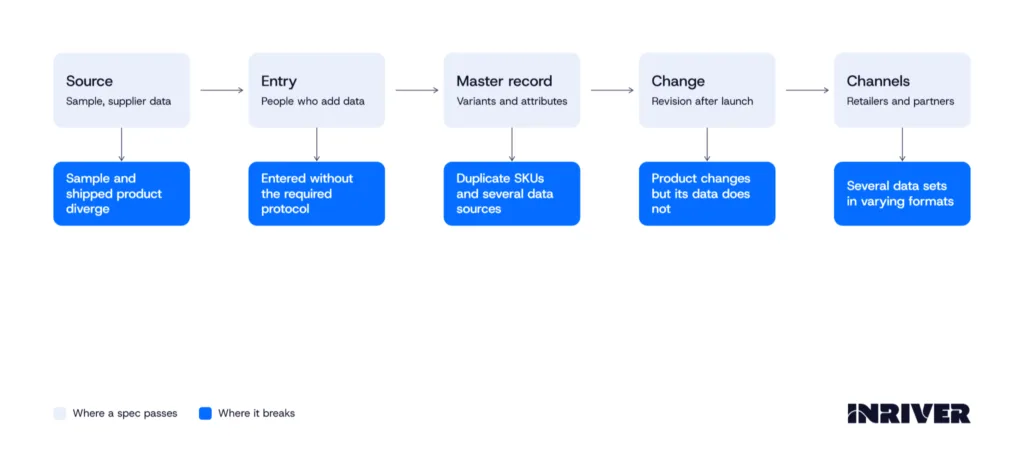
A spec can be wrong before anyone enters it into the system, as one retailer noticed a lag between a supplier’s new item setup and the item’s in-store availability; during that lag, the gap between the original sample and the actual product widened while the original data stayed unaltered.
People who add the data can introduce errors as well, because measurements and extended descriptions may be treated as a formality when a product is introduced and may not be carefully recorded. One supplier removed the ability to copy and paste dimensions so that its packaging engineers check every product, however similar it looks to an existing package.
Your master record can introduce errors of its own, and a hearing healthcare company’s portfolio shows how, with 2,438 SKUs, or 19 percent of its hearing-aid portfolio, registered as separate SKUs for the same product variant and the customer’s name as the only difference in the product description.
If your company keeps multiple data sources for the same product, it can easily end up with inaccuracies and inconsistencies up and down the supply chain.
A product may also be modified after its launch without the data associated with it being updated, and differing requests for product data may result in multiple sets of data in varying formats, none of them comprehensive or wholly accurate.
Finding which of these points produced a given error in your catalog of thousands of SKUs depends on the patterns the wrong records form.
How do you catch tech spec errors if you have thousands of SKUs?
In the white paper published by GS1, JJSC mandates that every new item it launches must go through a packaging lab. In this lab, each item is scanned, measured with calipers, and weighed to ensure that the product data aligns with what is recorded in its SAP system.
However, a survey reveals that fewer than half of manufacturers have a reliable process in place to verify the accuracy and quality of their manufacturing data. To assist those who don’t yet have such a process, the table below outlines five patterns to check in your own records.
| What you see | What it points to | Where to look |
|---|---|---|
| The same item is wrong at several retailers | A problem in your own data | The master record and its source |
| The item is wrong at only one retailer | Whoever entered the data there, who may not have followed the protocol | The entry record and the person or team behind it |
| The same mistake appears across a whole category | One cause repeated across the category | The category-level setting, so one fix covers the category |
| A height, length, or width differs from the expected value | A typo, a mismeasurement, or swapped values | A root cause analysis of that record |
| The record disagrees with the physical product | A gap between the data and the item | A physical audit of a sampled item |
Routine physical audits, which compare an actual product with the most recent information shared about it, are the best way to test your data, and one large retailer runs its audits in these ways:
- Its data quality team goes to a nearby store and uses the actual product on the shelf to audit the product data.
- Automated equipment at one of its distribution centers helps capture the case dimensions of shipping units.
- It does not audit every one of the 100 or more attributes it requests in a category and instead focuses on the attributes that influence purchasing decisions or generate supply chain expense.
Counting errors this way tells you how many records are wrong today, and keeping that number low across every channel that receives your specs takes practices that apply wherever your data enters and wherever it changes.

How do you keep tech specs accurate across all your channels?
At the outset, one retailer’s data quality project seemed overwhelming given the hundreds of thousands of items it carries and the average of 100 attributes per item, and the work became more manageable once its rules ran in software and the company adopted them.
The six practices below apply the same approach to the rules, owners, and checks behind every channel that receives your specs.
1. Write accuracy rules for each product category
A retailer built data quality rules for about 200 product categories, and in its over-the-counter liquid remedies, the rules raise an error whenever a unit of measure isn’t recorded as a fluid ounce.
You can write rules around the units and values you expect in your own categories, and a package measurement standard gives a convention for dimensions that tells you to convert between inches and millimeters first, at 25.4 millimeters per inch, and to apply the rounding rules afterward.
2. Assign one owner and one source to every attribute
Industry guidance recommends appointing one entity, department, or individual as the sole owner of product data and assigning data owners throughout the organization, and a manufacturing survey found that 22 percent of respondents listed a lack of data governance and ownership among their top three obstacles to data-driven decisions.
You can apply that guidance by deciding which of your ERP, PLM, and PIM systems supplies each attribute and by naming the person who answers for its accuracy.
3. Train everyone who enters specs
One supplier began its data quality work with education, bringing in an industry body to teach its supply chain data management and global packaging teams the package measurement and GTIN management rules, because it considers mistakes in both areas common but preventable root causes of data quality issues.
The same supplier pairs reference materials with yearly refresher courses since staff turnover is inevitable, and guidance on rogue data entry, such as a sales rep adding product information, calls for additional training that explains who governs the data and how poor quality affects everyone.
4. Validate each record before it enters your system
One retailer enforces its rules as data enters its systems and blocks records with issues, and it corrects a value automatically only when a rule can determine the correct value with 100 percent certainty from other data points.
In an example test, 1,450 items fail, and 14,550 pass; automation corrects every failure caused by non-standard branding, and each remaining error goes onto the scorecard of the responsible individual for manual correction.
Inriver Content Onboarding checks incoming product data at the same point, before it enters the PIM, with a visual data review that lets you inspect the data in a spreadsheet-like grid and automated validation that flags missing values, incorrect formats, and blocked rows. The platform then loads validated data as structured product records, which fits teams that receive specs through spreadsheets, supplier exports, or ERPs.
5. Send every change through one data-sharing process
One supplier uses the Global Data Synchronization Network to give its retail partner real-time data updates, so the retailer knows immediately when a dimension, a weight, or another attribute changes in the supplier’s source system. That supplier also set up some products manually through a sales team outside the network, and after it made the network virtually mandatory for everything sold to that retailer, data quality improved, and it passed the retailer’s quarterly audits for the products in scope.
6. Check whether your spec data is ready for AI
The same survey describes AI readiness with examples of data that is well labeled, contextualized, governed, and accessible, and 49 percent of respondents rated their operational data low on that measure while only 6 percent rated it high. You can score your own spec data against those four terms before you apply AI to it.
Implementing six practices across thousands of SKUs and channels takes time and commitment, so in the next section, we’ll discuss how to start without addressing every SKU at once.
How do you improve specs accuracy without fixing every SKU at once?
One supplier describes its approach as starting small to scale, and it has implemented its data quality program for thousands of employees and more than 3,000 consumer SKUs.
The three questions below cover where to begin, how to measure progress, and who to involve, so you can apply the same approach to your own catalog.
- Which category should you start with?
One retailer audits particular product categories and notifies its suppliers before each audit, so you can begin with a single category of your own. Write that category’s accuracy rules, apply them, and compare the number of errors in its records before and after. - How do you measure progress?
The retailer’s lead product owner advises you to develop a scoring methodology that works for your organization, and the retailer found that its suppliers are motivated by metrics and improved their data quality after it began sharing its findings with them regularly. The share of its suppliers that fully qualified in the initial certification started as a low single-digit percentage and improved tenfold within about nine months after the retailer introduced stricter accountability. - Who should be involved?
One supplier says that working end to end with packaging engineers, supply chain data management, and customers is key to a sustainable data quality program, and another advises that when a data error affects customers or the business, you share it, work to uncover the root cause, and share again to confirm it does not recur.
If your specs reach you as supplier files, an Inriver expert can show you how Content Onboarding works with those files.
Ready to see Inriver in action?
Inriver transforms the way your business thinks about product data. Let an Inriver expert explain the many benefits of the enterprise-ready, fully adaptable Inriver platform.
- Get a personalized, guided demo of the Inriver platform
- Have all your PIM questions answered
- Free consultation, zero commitment
Thanks for choosing Inriver! We’ll be in touch soon.
Please try again in a moment.