Do you need a PIM system if you have SAP MDG?
November 13, 2026Already have SAP MDG? See what PIM adds. SAP MDG governs master data, while Inriver prepares product content for sales channels. Explore how the two systems work together.
Explore Inriver + SAPYes, you need a PIM alongside SAP MDG once your product information has to move beyond your operational systems and into the channels where buyers evaluate your products. SAP MDG gives you a central hub to govern master data across your enterprise, but it was not designed for rich product content, so a PIM prepares that content for each channel.
In this article, you’ll understand how the two systems differ, when you need a PIM alongside SAP MDG, how they work together, and the questions SAP teams ask most often.
What’s the core difference between a PIM platform and SAP MDG?
SAP MDG governs how master data is created, changed, and distributed across your enterprise systems, while a PIM enriches product content and formats it for each channel. The table below compares what each one handles.
| SAP MDG | PIM | |
|---|---|---|
| Data it handles | Customer, vendor, finance, product, asset, and location master data, with material attributes that include units of measure, valuation, and plant data | Marketing descriptions and technical documents, held alongside product data imported from SAP ERP and supplier feeds |
| Change control | Integrated staging, approval, and a central audit trail | Role-based permissions, with every adjustment logged |
| Quality checks | Quality rules applied across data entry points, with monitoring and remediation, and consolidation of duplicates into best records | Automated validation and workflow rules inside a central workspace where your teams contribute and refine content |
| Where the data goes | SAP and non-SAP systems | E-commerce platforms, distributor portals, marketplaces, print catalogs, and mobile apps |
When do you need a PIM alongside SAP MDG?
You need a PIM alongside SAP MDG when any of these four situations applies to your product data:
1. Product data from many sources
If your product information is fragmented across PLM, spreadsheets, and supplier feeds, it cannot power commerce, syndication, or AI on its own, so a PIM consolidates it in one place.
2. Channels with different requirements
Marketplaces may require extended specifications, distributors may ask for their own classification standards, and e-commerce sites rely on enriched descriptions, images, and documentation, so one product can need several versions of its content.
3. Spreadsheets and custom integrations
Many SAP environments meet those requirements through spreadsheets, custom integrations, or duplicated data, which slows product launches over time and makes consistent experiences across channels harder to maintain.
4. An upcoming S/4HANA move
If you’re planning an S/4HANA migration, a PIM helps you establish scalable and flexible product content processes early in your transformation.
How do a PIM system and SAP MDG work together?
SAP MDG governs your master data and replicates it to your SAP and non-SAP systems; a PIM then pulls operational product data from those systems, enriches it, and distributes it to your channels.
In SAP’s own governance flow, the step after replication is adaptation or enrichment in local systems, and MDG’s integration scenarios include synchronizing and enriching product master data for product catalog and e-commerce solutions.
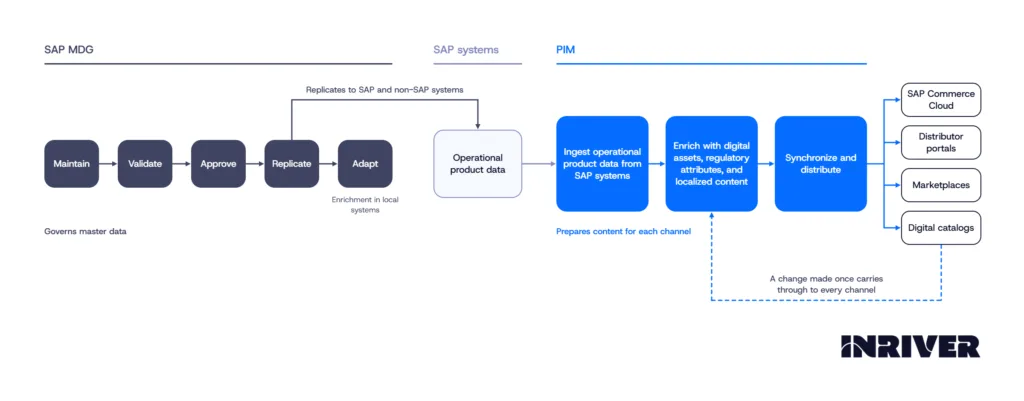
A PIM complements SAP ERP and Commerce Cloud instead of replacing them, so your operational product data stays in SAP while your teams enrich it in the PIM with digital assets, regulatory attributes, and localized content. After enrichment, the content synchronizes into SAP Commerce Cloud and reaches your other downstream channels, and each later change carries through without your teams rebuilding or reconciling content for each one.
How does a PIM system extend your SAP environment?
If you run SAP S/4HANA Public Cloud, the SAP-Certified S/4HANA Cloud Connector automates the flow of product master data into Inriver without custom development or changes to your ERP core. A second connector sends enriched product information to SAP Commerce Cloud on a schedule or on demand, and Inriver maintains both connectors when SAP updates. In the platform, AI agents and assistants support enrichment, translation, and validation in governed workflows.
You can book a demo with an Inriver expert to see how these connectors work with your SAP systems and to get your PIM questions answered.
Ready to see Inriver in action?
Inriver transforms the way your business thinks about product data. Let an Inriver expert explain the many benefits of the enterprise-ready, fully adaptable Inriver platform.
- Get a personalized, guided demo of the Inriver platform
- Have all your PIM questions answered
- Free consultation, zero commitment
Thanks for choosing Inriver! We’ll be in touch soon.
Please try again in a moment.