How PIM manages configurable and made-to-order product data
November 18, 2026PIM helps manufacturers manage configurable and made-to-order products through structured options, variants, and component relationships. Learn how it connects product information across systems and channels.
Explore PIM for manufacturingA PIM manages configurable and made-to-order product data by storing groupings, options, and descriptive content for each product once, so you maintain choices such as fabrics, material finishes, and modular components in one system instead of creating a separate record for every version a customer can order. Your PIM then supplies that product information to the systems and channels that use it, so every team works from the same data.
Configurable and made-to-order products both fall under manufacturing customization, where customers choose design features and add-ons before production begins, but they differ in how manufacturers build them. Configure-to-order products are assembled from predefined modules, so production can start right after the order is placed, whereas made-to-order products, such as couches and tables, are built from scratch once the order arrives. Engineer-to-order products also require a full design and engineering phase before manufacturing starts, and they typically belong to major contracts.
- What product data do configurable and made-to-order products need?
- How does a PIM manage configurable product data?
- How does a PIM work with PLM, ERP, and configurator systems?
- How do you implement PIM for configurable and made-to-order products?
- How are companies using PIM for configurable and made-to-order products?
- Where should you start with PIM for configurable products?
- FAQs
What product data do configurable and made-to-order products need?
Configurable and made-to-order products need six kinds of product data: a base product that holds shared information; option groups with their values; variants; configured items; compatibility relationships between options; and component or BOM references that connect each choice to the parts used to build it.
The table below describes what each element holds so you can compare it with the way your own product records are structured.
| Data element | What it holds | Example |
|---|---|---|
| Base product | The parent record that unites multiple product variants and holds the information they share | A sofa that customers personalize by design, materials, colors, and dimensions |
| Option groups and values | Groupings of choices, where each choice is a value that the customer selects | Fabric choices, material finishes, and modular components |
| Variants | Separate records that each carry a unique SKU along with their own inventory and price settings | Size, color, and material qualifiers |
| Configured items | The distinct product created when a customer’s choices meet a requirement, identified by a unique configuration ID that allows tracking through inventory | A configuration started from a sales order line or a sales quotation line |
| Compatibility relationships | Limits on which values a customer can select together | A hose linked to compatible items such as spring guards, hose fittings, and crimpers |
| Component and BOM references | Components connected through subcomponent relationships, with BOM lines that identify the manufacturing BOM for each component | Components defined once and reused across several product configuration models |
Creating a variant of every product gives customers more alternatives, but it also increases forecasting challenges, inventory costs, and unsold products that become obsolete, so manufacturers that adopt a configure-to-order approach can meet demand for unique products while reducing or eliminating obsolete inventory.
How does a PIM manage configurable product data?
A PIM manages configurable product data by holding option groups, variant families, relationships, and product content in one extensible data model, then applying governance, approval, and channel-specific output before the data reaches each system you use.
The table below shows what your PIM manages in each area, how it does that, and what it means for your team.
| What the PIM manages | How it does it | What it means for your team |
|---|---|---|
| Options and variants | Defines variant families, shared attributes, and valid values once, using an extensible data model that handles groupings such as fabric choices, material finishes, and modular components as the catalog grows | You maintain each option in one place instead of creating or updating variant records one by one |
| Relationships | Manages relationships alongside attributes, media, and classifications in one place before anything reaches your catalog | You maintain relationships in the same system as your attributes and media |
| Organization and governance | Consolidates product data into a single source of truth, with a data model that supports the complexity of new products, ranges, markets, and brands | You apply product data governance across all of your ranges, markets, and brands in one system |
| Product content | Supports descriptions, visuals, and videos, and lets you create product origin stories for every product, attribute, and customizable option | You can describe each customizable option with its own story as well as the product itself |
| Channel delivery | Applies validation and approval before publication, manages languages and regional content centrally, and publishes the same approved data to each channel | You approve product data before publication and control the rollout of translations |
| Configurator and CPQ data | Acts as the central repository of product information that feeds product configuration software | You supply your configurator with the same product information that feeds your other systems |
How does a PIM work with PLM, ERP, and configurator systems?
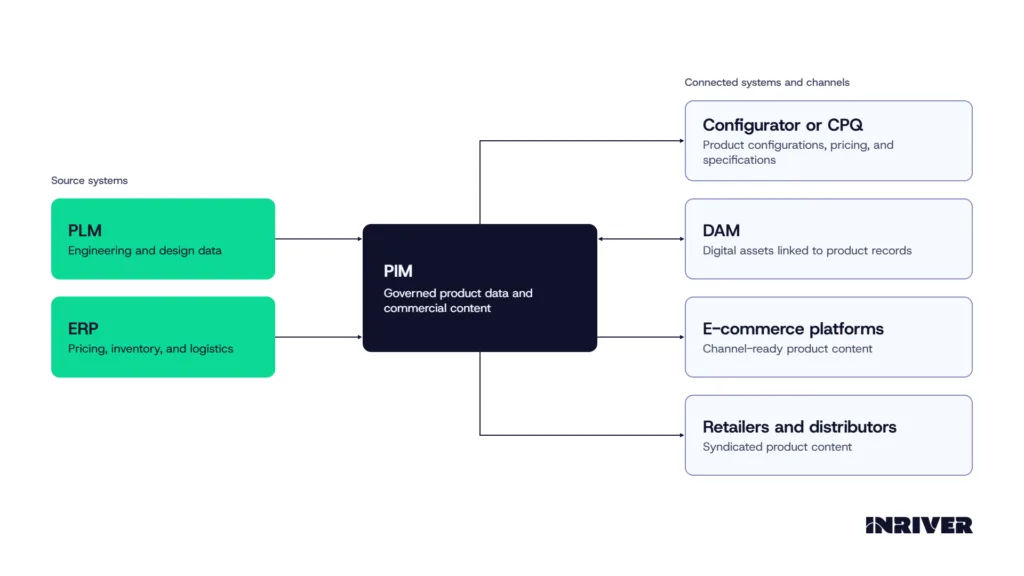
A PIM works with PLM, ERP, and configurator systems by receiving engineering data from your PLM and operational data from your ERP, adding the commercial content those systems were not built to hold, and supplying product information to your configurator and your channels. Each system owns a distinct layer of product data, and the table below shows what each one owns and what it exchanges with your PIM.
How do you implement PIM for configurable and made-to-order products?
You implement PIM for configurable and made-to-order products by setting measurable goals, auditing your data, building a data model around product families and components, starting with one product family, validating your data during migration, and reviewing your metrics before you expand.
1. Define your goals and capture baseline metrics.
Write down your strategic goals, milestones, and KPIs, and collect baseline figures such as return rates, cart abandonment rates, customer feedback, and operational efficiency before you deploy the PIM, so you can compare the same measures afterward.
2. Audit your product data and assign responsibility.
Run a comprehensive data audit near the beginning of the project to identify inconsistencies, outdated records, duplications, and inaccuracies in your data. Identify key users from each team early, and assign ownership so clear rules exist for how your data is collected, communicated, and distributed.
3. Build your data model around product families and components.
Analyze your product structures, identify your product families, and break your products into reusable components before you configure the model. Create one configurable product that contains its variations instead of a separate product for every combination, keep the list of values for each attribute manageable, and lock in the data model before you add syndication.
4. Start with one product family and onboard your data iteratively.
Begin with a focused catalog or region and connect the PIM in phases, so that value appears early while the full rollout continues. You can onboard your existing data without waiting for it to be perfect, because your PIM helps you clean it up as you go.
5. Validate your data during migration and train your users.
Check your product data for completeness and accuracy as you transfer it from legacy systems, so that quality issues surface and get resolved before they carry forward into the new environment. Provide non-technical users with targeted training, and build adoption time into your roadmap.
6. Review the same metrics and expand to the next product family.
Compare your results with your baseline, using quantitative measures such as conversion rates, number of returns, and net revenue alongside qualitative measures such as data consistency, content richness, and customer satisfaction. Once the results confirm the approach, extend it to your next product family.
How are companies using PIM for configurable and made-to-order products?
Living Spaces, a U.S. furniture and home furnishings retailer, had an ERP that couldn’t handle product information, and the challenges became prohibitive when the retailer decided to build a new version of its special orders system for customizing furniture online.
Facing complexity from thousands of customizable products and multiple variations, the retailer deployed the Inriver PIM, centralized its product information, and integrated Microsoft Dynamics ERP with Optimizely CMS. The ERP now feeds the e-commerce site with pricing and inventory information, while all other product content is created, managed, and fed through Inriver.
Living Spaces automated up to 70% of its product data workflows, achieved 60% to 70% faster product and content updates, and, after implementing Inriver, increased special orders by about 20%.

Where should you start with PIM for configurable products?
Managing configurable and made-to-order product data comes down to storing each option, variant, relationship, and piece of content once in your PIM, then publishing that information to every channel and connected system you use. Your PLM and ERP each keep the product data they own, and your PIM exchanges data with them and your configurator, so your commercial product information reaches your channels from one governed source.
You can begin by setting your goals and baseline metrics, then build your data model around the product families and components in one part of your catalog and onboard that data in phases. Once that first family is running, you can book a personalized demo with an Inriver expert to see how the Inriver PIM can get more value from your product information.
Ready to see Inriver in action?
Inriver transforms the way your business thinks about product data. Let an Inriver expert explain the many benefits of the enterprise-ready, fully adaptable Inriver platform.
- Get a personalized, guided demo of the Inriver platform
- Have all your PIM questions answered
- Free consultation, zero commitment
Thanks for choosing Inriver! We’ll be in touch soon.
Please try again in a moment.